
Context
I have been using Vue for 5 years now, and it is my primary framework of choice when building any application. Having worked with both React and Vue, I find Vue easier for handling state and managing side effects and initialization. I have not worked directly on a Nuxt project at work, so I explore it through side projects and experiments.
This blog is built on Nuxt and uses the @nuxt/content module to render markdown into pages like this one.
Usage
The Nuxt Content module is very easy to plug in and does a good job of wiring content written in MDC syntax to the rendered page. Some of the parts that make it a good option for such sites are:
- Frontmatter to configure metadata about the content.
- MDC syntax is easy to get started with. Simple text is a
p,##ish2,###ish3,**bold**makes text bold,[text](link)for a link,for images, etc. - The layout can be controlled using Nuxt's layout system. The cover image at the top, the table of contents at the side, theming, and more can all be styled as needed.
- In addition to MDC, YAML, JSON, and CSV can be used too.
- Any part of the content can be customized by overriding the corresponding element. So Nuxt Content uses the default
ProsePcomponent to render a paragraph, but it can be customized to use a custom implementation if a component namedProsePis added to/app/components/content/or the path configured in the Nuxt config. - Custom Vue components can be inserted in between using
::and similar syntax.
::card
Card content
::
These are only some of the many features that Nuxt Content provides, but these are the core ones I have used as of writing this post.
Application details
The post that put these features to the test at scale is "My First Solo Trip to Kyushu, Japan", a huge entry containing images, videos, links, and more. While creating it, I got to test a lot of different things, and the following is how I tried to handle the issues that came up.
The content
This one was more of a UX problem than a technical one. There is a lot of written content in the post, since it was about a 7-day trip. The first challenge was to separate content that can be deemed optional and make such sections skippable for readers. For this, a custom Vue component seemed like a good solution.
I created a component called Skippable.vue, which was a wrapper around an accordion. This made it easier to write all the text and have it available for SSG (static site generation), while making the text optional visually.
<template>
  <Accordion v-bind="accordionProps" :class="...">
    <AccordionItem :value="value">
      <AccordionTrigger>(Skippable) {{ title }}</AccordionTrigger>
      <AccordionContent class="...">
        <slot />
      </AccordionContent>
    </AccordionItem>
  </Accordion>
</template>
::skippable{title="Something that can be skipped"}
Some very loooong text here.
::
The title prop signals that there is more content underneath. The long text stays hidden from view until the reader decides whether they want to read it. This gives the author the flexibility to express as much as they want, and the reader the flexibility to consume as much as they want.
Extending functionality
The  syntax renders the image. But to add an option to expand it into a larger view, and to render the alt text as its caption, I extended the ProseImg component and used the NuxtImg component from the @nuxt/image module to serve optimized images. A full-screen Dialog opens when the maximize icon in the top-right of the image is clicked.

Since there is no straightforward way to specify a video in MDC, I created a custom component for videos with similar behaviors and interactions to the image component.
Flairs
For a bit of flair, I added a custom component called Todo that renders as TODO: or FIXME: content for things I'd like to do next time, as an analogy to the markers used in source code.
TODO:do something
Similarly, I also created a MapLink component that renders as a link with a map-pin icon prefix, which I use exclusively to link to locations.
Collections
To render multiple media items (images and videos), simply using ProseImg by itself was not enough, because each one took up a lot of width and height and made the page much longer. So I created a Gallery component (and a complementary GallerySlide) that rendered the media as a carousel. This made the content a lot more interactive for readers, while consuming less real estate.
Scaling
All these changes sound very appealing and easy, but by the end I spent about as much time getting it to scale to the point where it would simply render as I did composing it. Not everything was sunshine and rainbows as it first seemed.
Media handling
During the composition of the content, I first drafted all the textual content, and once everything was in place, I added the media. Fortunately, I served the media from a CDN. Unfortunately, the large amount of media almost crashed my browser as soon as I saved and HMR was triggered.
Problem 1: The first problem was relatively simple to identify. The sheer amount of media, along with their large sizes, occupied all of the browser's resources and made it unresponsive. After a quick analysis of the media, I found that all the videos were loaded during the render and were set with autoplay: true, controls: true, and preload: metadata. So all of them started to load and play on mount. The problem would have been minor if not for their size and count.
| Corpus | Count | Size on origin |
|---|---|---|
| Remote images | 120 | ~239 MB |
| MP4s | 25 | ~140.5 MB |
Solution: There could be a couple of ways to handle this. I started with autoplay. I disabled native autoplay and controls, and added an IntersectionObserver. This would only play a video when at least 50% of it was in the viewport, and would otherwise pause.
This reduced the number of videos playing simultaneously from 25 to 1 or 2 (depending on the viewport). It also reduced the number of active decodes happening simultaneously from ~51.8 MP to ~2.1 MP.
The next step was to reduce the number of videos that buffered at mount, and defer buffering until playback was actually required. To achieve this, I updated preload from "metadata" to "none". This prevented the videos from buffering at mount, and left them waiting until each video was in view.
With that in place, the next hurdle was to handle the media before it was fetched. My options were to curb the count, or curb the size. I did not want to curb the count, so size it was.
All my images were WebP, converted from JPG. To recompress images, I used ImageMagick's magick CLI. The following command resized larger images and reduced their quality to 80%:
magick input.webp -resize "1600x1600>" -quality 80 output.webp
For videos, I used ffmpeg, a popular choice for encoding video. Here's the script I ran:
ffmpeg -i in.mp4 -vf "scale='min(720,iw)':-2" -c:v libx264 -crf 28 -preset slow -an -movflags +faststart -nostdin out.mp4
The script did the following:
- scales width to at most 720px (height follows aspect ratio)
- encodes as H.264 with
faststart, muted-friendly - CRF 28 (roughly ~1–2 Mbps)
- drops the audio from the videos
The results were great. I could see a huge reduction in the overall size of the resources being loaded. While reviewing the results, I also deleted one image.
| Metric | Before | After | Delta |
|---|---|---|---|
| MP4s (25) | 140.5 MB | 20.4 MB | −85% |
| Images (119) | 239.1 MB | 33.9 MB | −86% |
| Total | ~380 MB | ~54 MB | −86% |
Problem 2: Now that loading media had mostly been taken care of, the whole page still took considerable time to mount. After some investigation, it seemed to be the galleries. Each gallery loaded and initialized Embla, which was responsible for the carousel behavior.
The first solution I considered was to defer Embla's client-side behavior until the gallery reached the viewport. This meant fewer galleries initialized on mount, which was a good win. The other option was to mark the gallery component as ClientOnly, avoiding rendering it on the server. Although that looks like a win, it hurts SEO, since it keeps the media out of the SSR HTML. So I went with the first approach.
The fix worked great for the first 12 galleries, but the rest weren't mounted even when they were in view. It seemed like the problem was the way content was rendered using the ContentRenderer component.
The ContentRenderer component provides the ability to override any prose component (as seen in the Usage section). To support this, it uses defineAsyncComponent to load the custom implementation if it exists, or the default implementation otherwise. Given the sheer size of the content, there were close to 200 components in total trying to load asynchronously, which caused some of them to fail to load correctly.
Solution: To avoid loading the components asynchronously, the fix was to mark the content components as global: 'sync', so Content resolves them via resolveComponent instead of defineAsyncComponent(import()). This resolved the gallery loading problem, at least for now.
// nuxt.config.ts
hooks: {
  'components:extend'(components) {
    for (const component of [...components]) {
      const path = component.filePath.replace(/\\/g, '/')
      if (path.includes('/components/content/')) {
        component.global = 'sync'
      }
    }
  },
}
Hydration mismatches
With such a huge render tree, the content ran into hydration mismatch issues. A hydration mismatch is when the content rendered on the server side differs from what's rendered on the client side.
Problem: In my case, multiple components hydrated onto the wrong DOM nodes. ContentRenderer wraps every resolved setup component in defineAsyncComponent(() => Promise.resolve(component)). In long MDC trees, this desyncs hydration. As a result, Vue keeps the correct props while the DOM retains another instance's attributes. This issue affected only the custom components, and since I had a lot of Gallery and GallerySlide components, it was quite visible. Usually the problem resolved itself on the first re-render, whether triggered by HMR or anything else that caused such a component to re-render.
Solution: Since there was no way to stop upstream ContentRenderer from wrapping components that way, I overrode ContentRenderer. This custom implementation does not wrap the components in defineAsyncComponent. Here's the line I omitted:
if ('setup' in componentObject) {
  return defineAsyncComponent(() => Promise.resolve(componentObject as Renderable))
}
Along with this, some other changes to nuxt.config.ts were as follows:
hooks: {
  'components:extend'(components) {
    // Checking if we have the overridden ContentRenderer
    const override = components.find((c) => {
      const path = c.filePath.replace(/\\/g, '/')
      return (
        c.pascalName === 'ContentRenderer' && path.includes('/app/components/ContentRenderer.vue')
      )
    })
    for (const component of [...components]) {
      const path = component.filePath.replace(/\\/g, '/')
      // Marking all components as "sync" components globally
      if (path.includes('/components/content/')) {
        component.global = 'sync'
      }
      // Remove the default ContentRenderer from the components array if we have an overridden implementation
      if (
        override &&
        component.pascalName === 'ContentRenderer' &&
        (path.includes('/@nuxt/content/') || path.includes('/@nuxt+content@'))
      ) {
        const index = components.indexOf(component)
        if (index !== -1) components.splice(index, 1)
      }
    }
  },
}
Excessive DOM nodes
Even with many improvements to correctly render the tree, performance issues remained, as some components were still problematically designed.
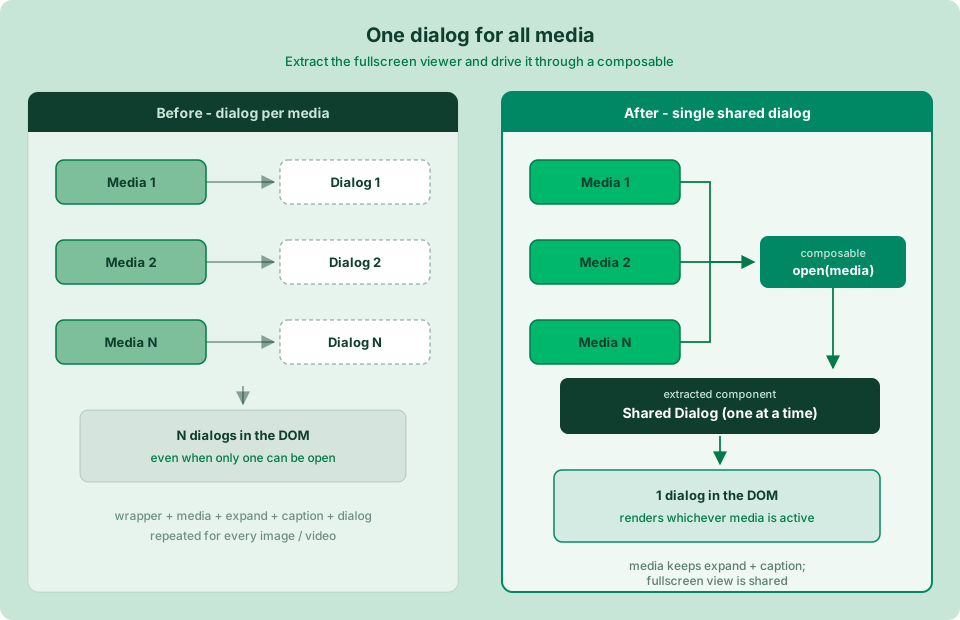
Problem: The number of DOM nodes to render was still high. Some of the core components contributing to this were all media-related. Each component had multiple responsibilities and interactions:
- a wrapper
- the main media, image or video
- a button to trigger expansion
- a section for caption
- a dialog box for full-screen view
- children of the dialog boxes
Solution: It must be pretty obvious from the list above that the dialog box does not need to be rendered for every media item separately. It can stay as a single component that renders one media item at a time. So I updated the implementation to extract the dialog and wire up media display through a composable.
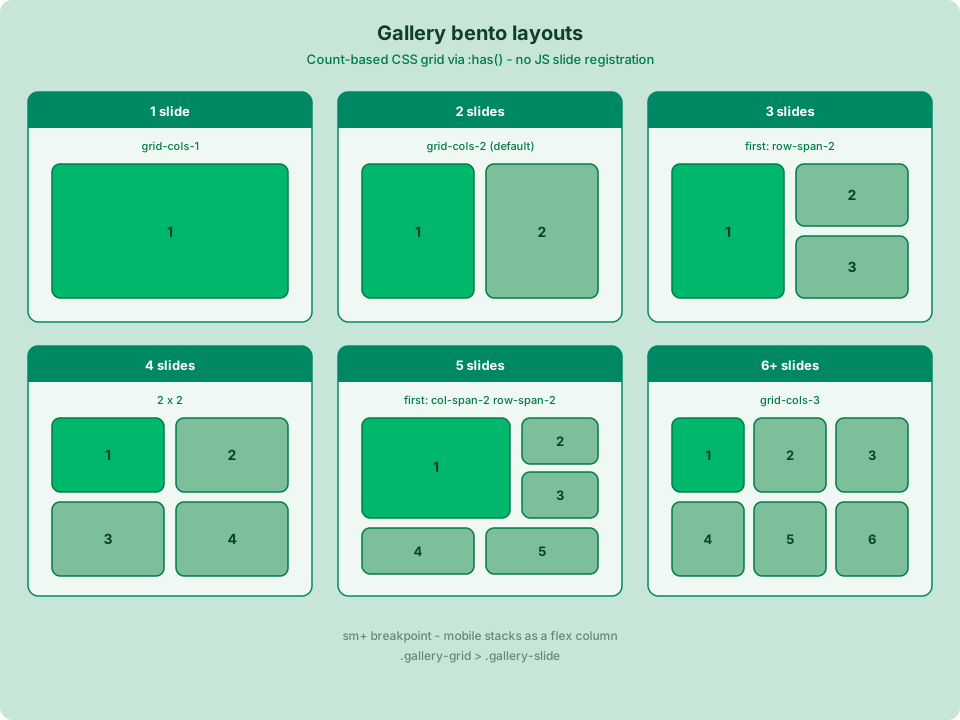
Choice: Now I had a choice: either keep supporting Embla for carousel behavior, or eliminate it for a smoother, simpler experience. I chose to move to a "bento" grid layout based on the number of children.
With this change, the number of DOM nodes dropped by roughly 1,100 nodes, which was a huge boost to the rendering speed of the page.
Even with these changes, there were still occasional hydration mismatches here and there. A mismatched image in the gallery, or wrong CSS due to incorrect props, and so on. A simple fix was to remount the components, or set the attributes of the rendered elements on mount if they didn't match their props.
// Gallery.vue
onMounted(async () => {
  await nextTick()
  const el = rootEl.value
  if (el && !el.classList.contains('gallery-grid')) {
    el.className = rootClass.value
  }
})

// ProseA.vue
onMounted(async () => {
  await nextTick()
  const el = anchorRef.value
  if (!el || !props.href) return

  const domHref = el.getAttribute('href') ?? ''
  if (domHref !== props.href) {
    el.setAttribute('href', props.href)
  }

  const target = normalizedTarget.value
  if (target && el.getAttribute('target') !== target) {
    el.setAttribute('target', target)
  }
  if (target === '_blank' && el.getAttribute('rel') !== 'noopener noreferrer') {
    el.setAttribute('rel', 'noopener noreferrer')
  }
})
Takeaways
This post looks at some of the capabilities and challenges of using Nuxt Content. It also emphasizes the need for good component design and a solid understanding of the library in use. Some key takeaways:
- All media assets should be adequately encoded
- Components should be designed with maximum reusability in mind
- Understand the limits of any module, and the ways to work around them
As AI plays a growing role in the development process, understanding these points is essential to steering development toward a readable, maintainable, and scalable outcome.